As I was completing my video entry for the 2009 Google Teacher Academy, I kept coming back to a phrase I heard somewhere, "We are currently preparing students for jobs and technologies that don't yet exist, using technologies that haven't been invented, in order to solve problems we don't even know are problems yet." That line has stuck with me since I first heard it.
I meet so many teachers that think we are instilling knowledge into children. The best teachers think that we are teaching students how to think and learn, for most of the knowledge itself will become obsolete.
For my project, I was determined to find the source of this great quote.
My search led me to The Fischbowl blog and a post about the original PowerPoint presentation, entitled "Did You Know?," created by Karl Fisch and Scott McLeod. Apparently, XPLANE has reworked the information into this thought provoking video (2007).
UPDATE (7.6.09): Here is an even more recent version (2008).
This particular version has an expanded focus on the idea that "we are living in exponential times." This is truly incredible and no doubt has significant implications for education. This only strengthens my theory that, as a teacher, I don't know everything... I CAN'T know everything. I may be more educated and have more experience, but I am learning right along with my students every day.
Thursday, July 02, 2009


Saturday, March 21, 2009
RIP: iMovie 06 download is no longer available
So, I'll admit it, I haven't been keeping up on my Mac news. I heard about Steve Job's health issues, the new iPod Shuffle and the contract-free iPhone, but somehow I missed this - Apple pulled their iMovie 06 download?!
I was horrified by the new iMovie 08. However, I was mollified by Apple graciously providing a free download of iMovie HD 6 to all registered users of iLife ’08. This afternoon, a young filmaker asked me how to "get that version of iMovie that's cool" because she doesn't like "the one with the star." So, I head over to my trusty link and... gasp!... page not found! Apparently, on Jan 27, 2009, blogs started to report that Apple had removed the download page for iMovie HD 6 in preparation for their iMovie 09 release.
Oh, how I wished I had archived that dmg....
I was horrified by the new iMovie 08. However, I was mollified by Apple graciously providing a free download of iMovie HD 6 to all registered users of iLife ’08. This afternoon, a young filmaker asked me how to "get that version of iMovie that's cool" because she doesn't like "the one with the star." So, I head over to my trusty link and... gasp!... page not found! Apparently, on Jan 27, 2009, blogs started to report that Apple had removed the download page for iMovie HD 6 in preparation for their iMovie 09 release.
Oh, how I wished I had archived that dmg....
Tuesday, September 02, 2008
Shelfari - Social Networking for Book Lovers!
I love books, bordering on an addiction. I don't watch movies, and I don't even own a TV, but I read more than I should. Reading entertains me, educates me, and provides an excellent form of procrastination. And it passes the time on public transportation.
So, imagine my glee when a student "requested friendship" to a site called Shelfari. Now, as a middle school teacher, I have been invited to join MySpace, Facebook, IMVU, and even Club Penguin by my students. I have shied away from such social networking sites in the past, however, I have never been able to resist a good book.
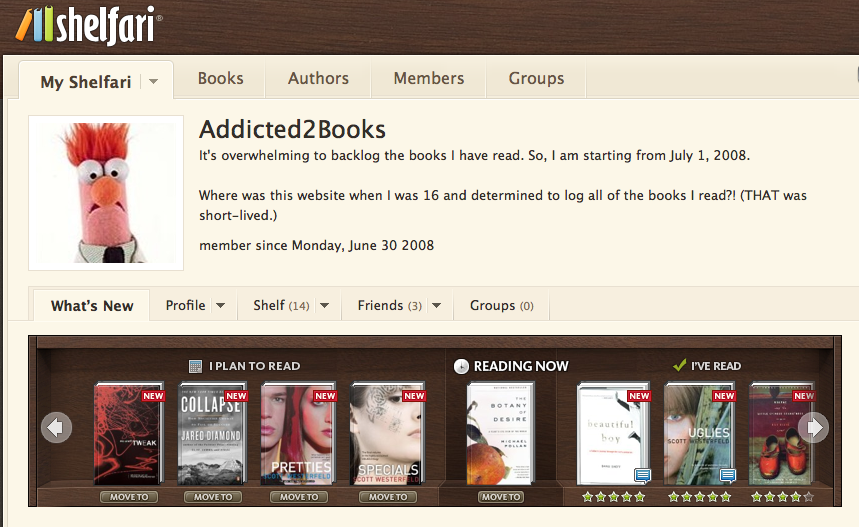 I checked out the site and it was love at first sight. The site allows you to track which books you have read, are reading, and are planning to read. You can give ratings, write reviews and document when you completed each book. Like most social networking sites, you can post questions to discussion boards and read others' reviews. You can also recommend books to friends. Plus the user interface is really clear and easy.
At first, I thought I wouldn't want to take the time to upkeep my account, but there is something strangely satisfying about seeing all those texts sitting on my "shelf," chronicling my recent literary adventures. It is also great to add book recommendations to my "planning to read shelf" since I have often written recommendations on scrap paper, only to lose them by the time I checked out my next book.
Shelfari was launched in October 2006. This Seattle startup was founded by former RealNetworks employees Josh Hug and Kevin Beukelman. "Just as Flickr was social media around photos or YouTube around videos or Digg around news, we are building the first social media site focused on people that read books," said Hug.
Shelfari, like any self-respecting website, has its own blog. From their blog, I learned that Shelfari was acquired by Amazon in late August, 2008.
Although, all does not seem to be rosy. According to a blog post of one of Shelfari's competitors, LibraryThing, Shelfari has some nefarious practices that can result in spam being sent to your address book. According to this post:
I still think it is a great site. If anyone has used its competitors, GoodReads or LibraryThing, I would love to know your thoughts.
So, imagine my glee when a student "requested friendship" to a site called Shelfari. Now, as a middle school teacher, I have been invited to join MySpace, Facebook, IMVU, and even Club Penguin by my students. I have shied away from such social networking sites in the past, however, I have never been able to resist a good book.
At first, I thought I wouldn't want to take the time to upkeep my account, but there is something strangely satisfying about seeing all those texts sitting on my "shelf," chronicling my recent literary adventures. It is also great to add book recommendations to my "planning to read shelf" since I have often written recommendations on scrap paper, only to lose them by the time I checked out my next book.
Shelfari was launched in October 2006. This Seattle startup was founded by former RealNetworks employees Josh Hug and Kevin Beukelman. "Just as Flickr was social media around photos or YouTube around videos or Digg around news, we are building the first social media site focused on people that read books," said Hug.
Shelfari, like any self-respecting website, has its own blog. From their blog, I learned that Shelfari was acquired by Amazon in late August, 2008.
Although, all does not seem to be rosy. According to a blog post of one of Shelfari's competitors, LibraryThing, Shelfari has some nefarious practices that can result in spam being sent to your address book. According to this post:
The method is simple. When you sign up for Shelfari you are dumped into a screen that offers to send out check-out-my-books invitations to friends. The user interface is confusing and deceptive, and what seems like an attempt to continue into the site really sends out hundreds or thousands of letters to everyone you've ever known by email. Reminder-letters follow. Skipping this step requires clicking out-of-the-way, gray non-underlined text.I don't think I've had a problem with it. Perhaps I was diligent in checking the "out-of-the-way, gray, non-underlined text." Or, maybe because I don't let ANY website troll my address books for "friends" (already on Shelfari). Apparently, if you choose to do that, the site is unclear. One blog commenter says, "The thing is, I didn't even see the 600 checked names (many of whom I promised not to spam) because they were checked down below my screen, and the "Send Invitations" button right underneath your "Friends Already on Shelfari" makes it look like you're only sending invitations to those guys. Slick, slick, slick." So keep your eyes open. And just type in your friend's addresses if you want to invite anyone.
I still think it is a great site. If anyone has used its competitors, GoodReads or LibraryThing, I would love to know your thoughts.
Sunday, May 04, 2008
Dreaming of ScreenFlow
 So, a few months back, I researched screencast software and video converters. Now I need to find a way to accent my mouseclicks (Mouseposé 3?) As I embark on this new screencasting adventure, I think I have found the ultimate program - ScreenFlow, released by Vara Software in February 2008, with the most recent update to version 1.1 just weeks ago. Here are just some comments from the blogosphere that lead me to check it out:
- "a recently released product called ScreenFlow just flat out rocks. For how simple it is to make great screen casts, it’s pretty mind blowing really." - I, Blog
- "screencasts made on Macs just got exponentially better"- tauw.com
- "I’m calling it The iTunes of Screencasting" - Fraser Speirs
- "Users who need to create video tutorials will find a program like ScreenFlow indispensable" - macnn
- "comes as a huge sigh of relief and wave of elation for Mac screencasters everywhere" - WebTVWire
You can record multiple tracks, mouse callouts, and video effects using a linear editor that looks as simple as iMovie! The only drawbacks? Some may be put off by the $99 price tag and it's (gulp) only available for Mac OS X Leopard. (The OS upgrade is only $116 at the Apple Education Store....)
Saturday, January 05, 2008
Converting .mov to .swf for Mac
In a previous post, I discussed my purchase of two screencast programs. One of them was kind of cumbersome, and the other one was easy to use, but did not output to .swf. I almost spent another $65 for a new program that was easy to use and outputted to .swf (Screen Mimic). Moments before I clicked "buy," a friend suggested I look for a program to convert my Quicktime files to Flash.
It was like a door was opened for me, leading to vast golden fields reflecting the late summer sun... OK, maybe I am being a bit melodramatic, but I was really excited. This means that I could record a silent screencast in iShowU, then import the Quicktime into iMovie 06 to edit the video and add voiceovers at my leisure. I had been frustrated that one stutter or misspoken word in a screencast often necessitated starting over.
So I found a blog post about converting Quicktime files into Flash which also had a tutorial for Mac users interested in using the (free) program FFMPEGX. However, this program only converts to FLA and there is a whole other process to be able to play it on the internet.
I need something simpler.
Video to Flash Converter 5.7 seems to be a popular choice, but it also seems to only work with Windows, despite what some sites claim. In fact, there seems to be no shortage of shareware for Windows use. I was getting discouraged.

Finally, I found Video2Swf which, ironically, is produced by the same company that makes Screenography. For $45 (on "sale") it seems to be a good choice. It even allows you to chose from a number of players to embed your video. (The Luddite in me enjoyed choosing the pretty designs.) The demo was clear and easy to use. (The demo puts a watermark across the middle of your output file.) Here's my first demo sample (a video inspired by a 2006 school trip to Europe):
It was like a door was opened for me, leading to vast golden fields reflecting the late summer sun... OK, maybe I am being a bit melodramatic, but I was really excited. This means that I could record a silent screencast in iShowU, then import the Quicktime into iMovie 06 to edit the video and add voiceovers at my leisure. I had been frustrated that one stutter or misspoken word in a screencast often necessitated starting over.
So I found a blog post about converting Quicktime files into Flash which also had a tutorial for Mac users interested in using the (free) program FFMPEGX. However, this program only converts to FLA and there is a whole other process to be able to play it on the internet.
I need something simpler.
Video to Flash Converter 5.7 seems to be a popular choice, but it also seems to only work with Windows, despite what some sites claim. In fact, there seems to be no shortage of shareware for Windows use. I was getting discouraged.
Finally, I found Video2Swf which, ironically, is produced by the same company that makes Screenography. For $45 (on "sale") it seems to be a good choice. It even allows you to chose from a number of players to embed your video. (The Luddite in me enjoyed choosing the pretty designs.) The demo was clear and easy to use. (The demo puts a watermark across the middle of your output file.) Here's my first demo sample (a video inspired by a 2006 school trip to Europe):
Thursday, January 03, 2008
iTunes is More Than Just Music
I have to admit, I haven't been keeping up with all the developments of iTunes. For years, I have used it as a great way to purchase music. But a recent article reopened my eyes to the wonderful host of resources within the iTunes store.
1. Scientific American 60 Second Science Video Podcast - complex ideas broken down into a managable 1 minute segment
2. How Stuff Works - one of my favorite websites - now a podcast!
3. VH1 Best Week Ever - when I gave up my TV, I only missed VH1 and the Discovery Channel. Now I can catch one of my favorite "guilty pleasure" shows. (Totally non-academic)
4. Teacher 2.0 (a group of educators who want to share ideas about using technology to help prepare students for the 21st century. "We're tired of preparing them for the Industrial Age.")
5. National Geographic - Wild Chronicles - cool short video segments on topics like the zoo dentist.
6. iTunes U (I just downloaded a couple lectures from Stanford on Global Warming)
7. KQED Public Broadcasting (QUEST in Northern California) - video segments on topics such as earthquakes, the physics of baseball, forensic science and nanotechnology. You can also download the corresponding educator guides!
For every topic I type in, there are free podcasts and videos. There are tutorials for things like Final Cut Pro and screencasts. And I haven't even started with the music videos yet. (Another unfortunate loss when I gave up my TV.) If you haven't checked iTunes out lately, look a little deeper than your music library.
He is part of a new generation of academic stars who hold forth in cyberspace on their college Web sites and even, without charge, on iTunes U, which went up in May on Apple’s iTunes Store.This inspired me look past the search bar in iTunes and to create a list of the coolest things I found that are not music (in no particular order). You will notice, however, that the list is heavily biased towards science. :)
1. Scientific American 60 Second Science Video Podcast - complex ideas broken down into a managable 1 minute segment
2. How Stuff Works - one of my favorite websites - now a podcast!
3. VH1 Best Week Ever - when I gave up my TV, I only missed VH1 and the Discovery Channel. Now I can catch one of my favorite "guilty pleasure" shows. (Totally non-academic)
4. Teacher 2.0 (a group of educators who want to share ideas about using technology to help prepare students for the 21st century. "We're tired of preparing them for the Industrial Age.")
5. National Geographic - Wild Chronicles - cool short video segments on topics like the zoo dentist.
6. iTunes U (I just downloaded a couple lectures from Stanford on Global Warming)
7. KQED Public Broadcasting (QUEST in Northern California) - video segments on topics such as earthquakes, the physics of baseball, forensic science and nanotechnology. You can also download the corresponding educator guides!
For every topic I type in, there are free podcasts and videos. There are tutorials for things like Final Cut Pro and screencasts. And I haven't even started with the music videos yet. (Another unfortunate loss when I gave up my TV.) If you haven't checked iTunes out lately, look a little deeper than your music library.
Wednesday, December 26, 2007
Screencast for Mac
So, I was inspired to create some tutorials, and needed to find a program to create screencasts. (What's a screencast? Check out articles in InfoWorld (2005), O'Reilly (2005), and see some fancy examples on the Apple site.)
A friend found me a very helpful blog post entitled Mac Options For Capturing A Video of Your Screen. "Brian" reviews a few options for screen capture, and I decided to give them a try myself, plus check out another program Screenography. All of these programs have free demos. They also all have similar customizable screen capture sizing and hot buttons.
Here is what I found:
App #1: Screen Mimic 2.2.1
Price: $64.95
Demo: 30 second movies only with a watermark on video recording
This was my favorite and by far the easiest to use, however, it is also fairly expensive. Screen Mimic allows you to save your project as Adobe Flash (SWF), Flash Video (FLV), or Quicktime (MOV) files. The encoding seems fairly quick and the quality of the video is excellent. I also like the idea, as "Brian" blogged, that you get a second chance to encode a selection if you change you mind.
Brian's issue with this program (in 2006) was the lack of audio recording. I can only imagine that the $24.95 version he reviewed lacked the audio options this more expensive version now has.
App #2: iShowU
Price: $20
Demo: Large green text on video recording
Somewhat more complex to use, but still fairly easy. There are a variety of presets, but at my level of experience, this is not a great help to me. I do like that you have the option to slow the capture rate when your mouse is not moving, which helps keep the file size down. The encoding is immediate, although you do not have a Flash option.
For $42, you can bundle iShowU with Stomp, a program which allows you to compress, crop and apply affects to your videos.
App #3: Screenography 1.013
Price: $39.95 / $9.95 (for the lite version - stills only)
Demo: Giant yellow watermark on final capture
Another easy to use program, with the option of exporting as a QuickTime (mov) or Flash Animation (swf).
App #4: Snapz Pro X 2.1.2
Price: $29 (still capture) / $69 (movie capture)
Demo: 30 days unlimited, with annoying pop-ups (I haven't confirmed this)
This one is easy to use, and has cute little sound effects like "Action", "Cut", and "That's a Wrap." But I am not convinced it is worth the significant price difference.
Brian's final opinion:
My final opinion:
It's a tough choice between iShowU ($20) and Screenography ($40). However, I want the Flash option. I am perhaps biased towards iShowU due to its partnership with Stomp (though, admittedly, iMovie 08 has some similar features to Stomp, but I am a little salty about that release). I think I will stick with Screenography.
Update 1.3.07: Unfortunately I found the demos don't really reflect the actual usage of the programs, so here's my opinion after using the full versions. Granted, my experience is shaped my my personal machine and internet speed, but here are my reflections.
I started with Screenography, and was happy with my short (less than 30 seconds) clips and very happy with their being published to a .swf file. However, as I used it for longer projects, I found the rendering time to be long. After 3 minutes of recording, when I hit the hot key combination, it seemed to take up to 30 seconds to register, and then a number of minutes after that to render the movie enough to give me a "save" screen. This did not include the additional time to save the file. It was an exercise in patience. Also, the program would frequently "unexpectedly shut down."
For the $20, I decided to purchase iShowU. This one hasn't crashed on me, even up to a 4.5 minute presentation, but as far as I can tell, my only output option is Quicktime. I love the very fast rendering time, but miss the versatility of the Flash output.
So now I find myself longingly reading again about Screen Mimic. Even though I originally deemed it too expensive, I am finding myself with $60 spent on programs that did not best fit my needs. I'll keep you posted on how Screen Mimic works out for me.
A friend found me a very helpful blog post entitled Mac Options For Capturing A Video of Your Screen. "Brian" reviews a few options for screen capture, and I decided to give them a try myself, plus check out another program Screenography. All of these programs have free demos. They also all have similar customizable screen capture sizing and hot buttons.
Here is what I found:
App #1: Screen Mimic 2.2.1
Price: $64.95
Demo: 30 second movies only with a watermark on video recording
This was my favorite and by far the easiest to use, however, it is also fairly expensive. Screen Mimic allows you to save your project as Adobe Flash (SWF), Flash Video (FLV), or Quicktime (MOV) files. The encoding seems fairly quick and the quality of the video is excellent. I also like the idea, as "Brian" blogged, that you get a second chance to encode a selection if you change you mind.
Brian's issue with this program (in 2006) was the lack of audio recording. I can only imagine that the $24.95 version he reviewed lacked the audio options this more expensive version now has.
App #2: iShowU
Price: $20
Demo: Large green text on video recording
Somewhat more complex to use, but still fairly easy. There are a variety of presets, but at my level of experience, this is not a great help to me. I do like that you have the option to slow the capture rate when your mouse is not moving, which helps keep the file size down. The encoding is immediate, although you do not have a Flash option.
For $42, you can bundle iShowU with Stomp, a program which allows you to compress, crop and apply affects to your videos.
App #3: Screenography 1.013
Price: $39.95 / $9.95 (for the lite version - stills only)
Demo: Giant yellow watermark on final capture
Another easy to use program, with the option of exporting as a QuickTime (mov) or Flash Animation (swf).
App #4: Snapz Pro X 2.1.2
Price: $29 (still capture) / $69 (movie capture)
Demo: 30 days unlimited, with annoying pop-ups (I haven't confirmed this)
This one is easy to use, and has cute little sound effects like "Action", "Cut", and "That's a Wrap." But I am not convinced it is worth the significant price difference.
Brian's final opinion:
After trying them all, I think I’ll stick with iShowU. The developer offers a good product at a good price. Also, he is quick to offer support. The second option would be Screen Mimic, especially if you are intending to work with flash videos.
My final opinion:
It's a tough choice between iShowU ($20) and Screenography ($40). However, I want the Flash option. I am perhaps biased towards iShowU due to its partnership with Stomp (though, admittedly, iMovie 08 has some similar features to Stomp, but I am a little salty about that release). I think I will stick with Screenography.
Update 1.3.07: Unfortunately I found the demos don't really reflect the actual usage of the programs, so here's my opinion after using the full versions. Granted, my experience is shaped my my personal machine and internet speed, but here are my reflections.
I started with Screenography, and was happy with my short (less than 30 seconds) clips and very happy with their being published to a .swf file. However, as I used it for longer projects, I found the rendering time to be long. After 3 minutes of recording, when I hit the hot key combination, it seemed to take up to 30 seconds to register, and then a number of minutes after that to render the movie enough to give me a "save" screen. This did not include the additional time to save the file. It was an exercise in patience. Also, the program would frequently "unexpectedly shut down."
For the $20, I decided to purchase iShowU. This one hasn't crashed on me, even up to a 4.5 minute presentation, but as far as I can tell, my only output option is Quicktime. I love the very fast rendering time, but miss the versatility of the Flash output.
So now I find myself longingly reading again about Screen Mimic. Even though I originally deemed it too expensive, I am finding myself with $60 spent on programs that did not best fit my needs. I'll keep you posted on how Screen Mimic works out for me.
Sunday, November 11, 2007
Music Genome Project & Pandora
This is pretty cool... no, make that AWESOME. A (new) student of mine told me about Pandora, since his father is involved with the project somehow. You can listen for free for about 5 - 10 minutes, and then you have to register to continue listening. You only have to pay the $36 annual subscription if you want it on your cell phone or to use the site ad-free. Otherwise it is FREE (ad-supported). You can navigate through the choices it makes, help "train" the station, and there is even a direct link to iTunes or Amazon to buy songs you like! In just 10 minutes, I was introduced to two more bands that interested me. (I started with a "Beastie Boys" station....lol.)
On January 6, 2000 a group of musicians and music-loving technologists came together with the idea of creating the most comprehensive analysis of music ever.
Together we set out to capture the essence of music at the most fundamental level. We ended up assembling literally hundreds of musical attributes or "genes" into a very large Music Genome. Taken together these genes capture the unique and magical musical identity of a song - everything from melody, harmony and rhythm, to instrumentation, orchestration, arrangement, lyrics, and of course the rich world of singing and vocal harmony. It's not about what a band looks like, or what genre they supposedly belong to, or about who buys their records - it's about what each individual song sounds like.
Since we started back in 2000, we've carefully listened to the songs of tens of thousands of different artists - ranging from popular to obscure - and analyzed the musical qualities of each song one attribute at a time. This work continues each and every day as we endeavor to include all the great new stuff coming out of studios, clubs and garages around the world.
This Music Genome Project is an effort ... to "capture the essence of music at the fundamental level" using over 400 attributes to describe songs and a complex mathematical algorithm to organize them."
Sunday, October 21, 2007
How do We Teach the to Future?
Sheryl Nussbaum-Beach has a lot to say about 21st century collaborative learning. I ran across a keynote she delivered as part of the Tuanz Educational Conference 2007 in New Zealand and was struck by some of the following questions:
This reminds me of a podcast I recently ran across. (You can find them on Twitter or check out the podcast on iTunes) The description states that "Teachers 2.0 is a loose group of educators who want to share ideas about using technology to help prepare students for the 21st century. We're tired of preparing them for the Industrial Age." They have a good point. I look forward to hearing what they have to say.
- Have you used the new WWW? The new WWW: Whatever, Wherever, Whenever.
- What do you need to know, when most of recorded knowledge is a mouse click away?
- In light of this, what do students still need to memorize?
- How do we prepare our students for jobs that don't exist yet, using technologies that haven't yet been invented in order to solve problems we don't even know are problems yet?
This reminds me of a podcast I recently ran across. (You can find them on Twitter or check out the podcast on iTunes) The description states that "Teachers 2.0 is a loose group of educators who want to share ideas about using technology to help prepare students for the 21st century. We're tired of preparing them for the Industrial Age." They have a good point. I look forward to hearing what they have to say.
Saturday, September 29, 2007
Ten Essential Qualities for a Happy, Healthy Life
 The Chicago Tribune ran a blurb on a new book, Great Kids: Helping Your Baby and Child Develop the Ten Essential Qualities for a Happy, Healthy Life.
I haven't read the book yet, but check out this list of "Ten Essential Qualities":
1. Engagement (relating to others)
2. Empathy
3. Curiosity
4. Communication
5. Emotional Range
6. Genuine Self-Esteem
7. Internal Discipline
8. Creativity and Vision
9. Logical Thinking
10. Moral Integrity
Wouldn't the world be a better place if every person had these ten qualities? I can use this list to focus on what traits I am encouraging and rewarding in my middle school students.
I'm glad he wrote the book, but wouldn't it be great if we didn't need it? It seems childrearing used to be intuitive, but now requires explicit instructions to avoid raising a menace to society.
Two of the most powerful ideas I ran across in this article were:
1. Learning to empathize begins in infancy. Suggest helping him/her tunes into others' feelings by making your feelings clear, in facial expression and voice.
2. Your child will learn ethics from how you treat him/her, not by what you say.
Ain't THAT the truth?!
Thursday, September 27, 2007
Finally Joined YouTube
OK, I did it. I joined YouTube. You'd think as a pseudo-geek, I would have jumped on this earlier, but I finally have my own channel, inspired by my kid blog.
YouTube is interesting. Yes, if you are not careful, you will find yourself surfing videos of laughing babies, dancers in banana suits, and the latest variation of Charlie the Unicorn. However, as I have said before, I have used it extensively for science and media literacy lessons in grades 1 through 8.
So I wonder why, when the first time a student asked me if he could use YouTube as a source for a class project, my gut reaction was, "no." When I thought about it for a minute, I changed my mind. YouTube is almost a philosophical extension of Wikipedia. And I decided to treat it as such. Sure, the student can use it as a source. But, like any article on Wikipedia, they must double-check their facts on another reputable source. However, how valuable was it for them to watch and interview with Barack Obama, or to hear a theremin played? Certainly more so than merely text and still images could provide.
One concern is that students may quickly fall off task, or be subjected to inappropriate language in the comments section. This just seems like a teachable moment (at least at the middle school level) regarding media literacy and responsible internet use.
Sadly enough, my old district banned both YouTube and Wikipedia in its schools. I wonder if this is a positive move or a disservice to the students. Social networking sites and wikis are not going away... shouldn't we embrace the opportunity to teach the kids to use these tools responsibly instead of taking them away?
Anyway, back to YouTube, someone should have warned me. Once I signed up, I got this message in the second box below. Wow. Harsh. :)

YouTube is interesting. Yes, if you are not careful, you will find yourself surfing videos of laughing babies, dancers in banana suits, and the latest variation of Charlie the Unicorn. However, as I have said before, I have used it extensively for science and media literacy lessons in grades 1 through 8.
So I wonder why, when the first time a student asked me if he could use YouTube as a source for a class project, my gut reaction was, "no." When I thought about it for a minute, I changed my mind. YouTube is almost a philosophical extension of Wikipedia. And I decided to treat it as such. Sure, the student can use it as a source. But, like any article on Wikipedia, they must double-check their facts on another reputable source. However, how valuable was it for them to watch and interview with Barack Obama, or to hear a theremin played? Certainly more so than merely text and still images could provide.
One concern is that students may quickly fall off task, or be subjected to inappropriate language in the comments section. This just seems like a teachable moment (at least at the middle school level) regarding media literacy and responsible internet use.
Sadly enough, my old district banned both YouTube and Wikipedia in its schools. I wonder if this is a positive move or a disservice to the students. Social networking sites and wikis are not going away... shouldn't we embrace the opportunity to teach the kids to use these tools responsibly instead of taking them away?
Anyway, back to YouTube, someone should have warned me. Once I signed up, I got this message in the second box below. Wow. Harsh. :)
Wednesday, August 29, 2007
Review of iMovie '08 ... the Shock of My iLife!
I was so excited. I unwrapped my new Macbook Pro ceremoniously, reverently hit the power button and waited with anticipation. I had worked with iMovie for years, and was especially pleased with iMovie '06. Now, I would have my first look at the newest version of iMovie. When my dock appeared, I was pleasantly surprised by the slick new icon.
As I opened up the program, I was a little awed at the total transformation. My simple little program screen had turned into a completely different movie app.
However, as I navigated around the new program, I thought: Apple, what are you thinking?
I have used iMovie for years in the classroom. It is simple and offers many options for kids to create quite polished products. Some of the better features of iMovie 06 include:
To be fair, some people like the improvements. MacWorld calls it "the iPhoto for movies." There is more color-correction and cropping options, and no rendering time when you add effects. Also, it can input a wider variety of video formats. But, that's about it. Some people theorize that Apple wanted to prevent iMovie from competing with Final Cut Pro. Other people recognize the good along with the bad.
When I recovered enough to open up a new tab in Firefox, I read that many people are outraged. Thankfully, Apple offers a free download of iMovie 06. (CORRECTION 3/21/09: The download is no longer available as iMovie 09 is released.)
I can breathe again.
pleased with iMovie '06. Now, I would have my first look at the newest version of iMovie. When my dock appeared, I was pleasantly surprised by the slick new icon.As I opened up the program, I was a little awed at the total transformation. My simple little program screen had turned into a completely different movie app.
However, as I navigated around the new program, I thought: Apple, what are you thinking?
I have used iMovie for years in the classroom. It is simple and offers many options for kids to create quite polished products. Some of the better features of iMovie 06 include:
- Timeline view
- Multiple audio track editing
- Themes
- Many editing options (transitions / titles / Video FX like reverse & slow)
- Ability to open more than one project at a time, and copy & paste clips
- Exporting selected clips only
- DVD chapters and integration with iDVD
- Option for third party plug-ins
- Timeline view
- Multiple audio track editing
- Themes
- Many editing options (transitions / titles / Video FX like reverse & slow)
- Ability to open more than one project at a time, and copy & paste clips
- Exporting selected clips only
- DVD chapters and integration with iDVD
- Option for third party plug-ins
To be fair, some people like the improvements. MacWorld calls it "the iPhoto for movies." There is more color-correction and cropping options, and no rendering time when you add effects. Also, it can input a wider variety of video formats. But, that's about it. Some people theorize that Apple wanted to prevent iMovie from competing with Final Cut Pro. Other people recognize the good along with the bad.
When I recovered enough to open up a new tab in Firefox, I read that many people are outraged. Thankfully, Apple offers a free download of iMovie 06. (CORRECTION 3/21/09: The download is no longer available as iMovie 09 is released.)
I can breathe again.
Subscribe to:
Posts (Atom)